Saturday, January 10, 2026

Routage pour tous

Le routage est cette façon de calculer la meilleure route pour un voilier, entre un point de départ, et un point d'arrivée, en fonction des conditions meteo, en général obtenues dans un référentiel espace-temps, sous forme de fichiers GRIB.
En course, il s'agit bien sûr d'aller le plus vite possible, mais en croisière, les paramètres peuvent être différents, du style
  • Pas de vent de plus de 40 nœuds
  • Pas de vent dans le nez
Genre : "45 nœuds sur le nez, non merci !".
Voyez les détails sur ce genre de procédé ici.
Les calculs que ça implique ne sont certes pas triviaux ni anectotiques, mais ce n'est "que" de l'algorythmique. Pas d'IA, ni de ressources vidéo ne sont nécessaires. En conséquence, ceci peut être confié à un ordinateur "normal", pas besoin de cloud ni de ressources onéreuses et disproportionnées. Un Raspberry Pi fait le job ; sans blague, j'ai essayé.

J'en rajoute bientôt, ne quittez pas !

Thursday, January 08, 2026

GRIB and routing, keep posted

It's been a long time...
I'm reviving the routing and GRIB softs.
Some navigation softwares are running on Windows only, amazing.
I've recently been able to run Windows on a Raspberry Pi (5), and that works (see here), but there is also other ways to compute all this outside of Windows...
Stay put, I'll be back.

Friday, November 24, 2023

Low Tech & Co, laptops and nav stations

Here are a couple of links, intending to help to build useful and cheap devices. They've all been tested in the real world.
  • The cheapest Nav Station, Here.
  • The cheapest laptop, already mentioned, but slightly updated here.

The links above will lead you to pages were you'll find all the required STL: files (for 3D printing) and descriptions of the required hardware.

Tuesday, June 27, 2023

Point par relèvement, avec ou sans lunettes

 On était en mer ce week-end, et j'ai constaté quelque chose que je ne connaissais pas, et qui mérite d'être  - au moins - partagé. 

C'est l'influence de mes lunettes sur la déviation du compas de relèvement.

Au début, j'étais très fier de constater que je savais toujours faire un point, ne passons pas à côté des choses simples.

J'ai bien fait d'en profiter, car peu après, c'était n'importe quoi... Mais j'ai trouvé la cause du problème : c'est mes lunettes.

Sans lunettes:


Avec lunettes à proximité, plus de 10 degrés de déviation !!


À garder en tête (ou dans la poche)...

Ceci me rappelle ces "anciens" compas de relèvement qu'on tenait à bout de bras..., et qui étaient sans doute absous de cette déviation incongrue. Le premier que ça fait rire se ramasse une baffe.

Fair winds to all !


Wednesday, June 22, 2022

Gabor's law

We are not going to ban the printing press because there are idiots who write nonsense... But any technological advance can also give rise to all its perversions.
Dennis Gabor.

La loi de Gabor

On ne va pas interdir l'imprimerie parce qu'il y a des andouilles qui écrivent des âneries... Mais toute avancée technologique peut aussi donner lieu à toutes ses perversions.
Dennis Gabor.

Wednesday, July 14, 2021

Another (new) concept?

We would call it Flake Computing, as opposed to Cloud Computing.

Think of it like Cloud Computing without Internet...

For example, you are on your boat, crossing an ocean, you do not pay those big fees to get a satellite communication and connexion, but your boat is equipped with sensors - TCP (or so) enabled. You have a single board computer on board (<- now THAT's a good one! like a Raspberry Pi, BeagleBone, etc), that can emit its own network, WiFi or not. 

Nothing is preventing you from pulling the data emitted by the sensors, to process and compute them. Networks and Internet are different things... LAN, WAN, etc. (EZ: Entropy Zero...)

And nothing is preventing laptops, tablets, cell-phones or any such devices to get connected to the same network, to display the data processed by the single-board computer in a nice Web GUI (or any other GUI).

More later.


Friday, February 26, 2021

Night at 8

It's quite interesting to see that in several languages (mostly of latin or european origin), the word "night" begins with an "n", followed by something sounding very much like the number "8", in that language...
LanguageEightNight
Englisheightnight
Frenchhuitnuit
Spanishochonoche
Portugueseoitonoite
Italianottonotte
Latinoctonocte
Germanachtnacht
Dutchachtnacht
Brittoneizhnoz
Norwegianåttenatt
Romanianoptnopți

Friday, January 22, 2021

Several configurations for a Raspberry Pi Laptop

The Raspberry Pi is a cool single-board computer, modular, onto which you can hook up web cam, loudspeakers, external hard drives, all kinds of devices.
It has wireless and bluetooth connectivity, several USB ports, an Ethernet port. It has everthing I expect from a computer.
It can play music and movies, with the new Raspberry Pi 4 and its 8 Gigabytes of RAM, I can even do real development work without any problem, with tools like PyCharm or IntelliJ.

The Raspberry Pi 400 has recently been released, this is a very cool configuration to think about. For 100.00 USD it comes with the board (4Gb of RAM), a keyboard and a mouse. "All" you need to add is one (or two) HDMI screen(s).
A desktop HDMI screen can be an expensive device...

Along the same lines, below are a couple of configs I came up with before the Raspberry Pi 400 was released..., keeping in mind that those configs are mobile configs, not desktop ones.

The different configurations presented here can be acheived for less than 150.00 USD. And they do work for real.
Note: The configurations presented below have small screens... But nothing is preventing you to plug in a big one.

Here are several configurations for a small Raspberry Pi based laptop, to be taken on the go.

Click on the pictures to enlarge them.

The links in the text below will lead you somewhere in this git repo, with all the STL files and details on the hardware used for each configuration.


In its Pelican box, with a 7" touchscreen (no keyboard needed, it's like a tablet). The Raspberry Pi is behind the screen, ducked in the foam.

With a wood and plexiglass custom case, a breadboard, wireless keyboard with touchpad, and a 7" HDMI screen

Raspberry Pi 4, 7" HDMI high-definition screen, wireless keyboard, in its own 3D printed holder. (STL files for 3D-printing are available here).
Same config, but without the holder, in a Pelican case It all fits in
Putting things to work At work!

Yet another config, in a waterproof box, with webcam, 5" HDMI screen and small wireless keyboard (STL files for 3D-printing are available here).
In the box, closed. Connecting the loudspeakers
Unpacking At work.

With an Adafruit 3.5" TFT, as explained here:
Same config, with another enclosure (all STL files available here):

And there is a Raspbian OS 64-bit version in preview... I'm looking forward to the 16Gb version of the Raspberry Pi 4!

Sunday, November 29, 2020

Mac Look and Feel, on a real computer!

 Definitely something to check out: Twister OS. 

It runs on pretty much any Raspberry Pi 4, it comes loaded with tons of cool apps, and it possibly looks like a Mac Desktop 😀.

I'll look deeper into it, but it sounds already promising!


Thursday, November 26, 2020

PKIX path building failed

I was gradle'ng on the Raspberry Pi Zero as usual, and during a build, I had the following message: 

sun.security.validator.ValidatorException: PKIX path building failed: sun.security.provider.certpath.SunCertPathBuilderException: unable to find valid certification path to requested target

What the Fr*nch??!

I spent too much time and sweat trying to find a solution.
If that happens to you, just re-install your JDK!

sudo apt-get update 
sudo apt-get install openjdk-8-jdk-headless

The Raspberry Pi Zero cannot - so far - run a Java version above 8. 
This operation above also re-installs the required certificates. 
And you're back on track.

Friday, November 20, 2020

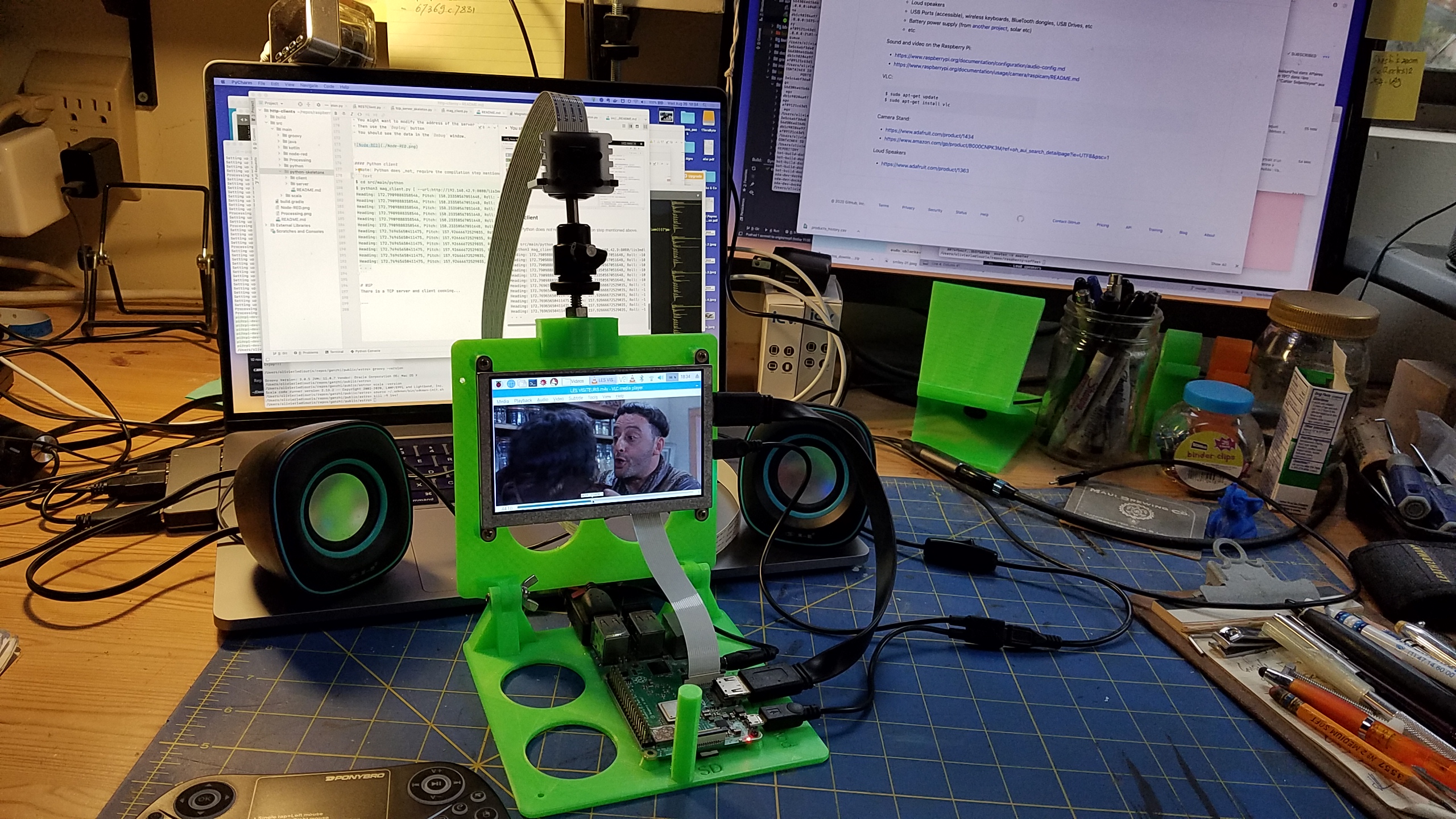
Raspberry Pi based fully featured small laptop

 The full project is here, with the STL and OpenSCAD files for 3D printing, and the list of parts.

It comes with screen, keyboard, touchpad, speakers, camera, USB ports...

It plays movies, music, fully featured!! And for less than $100.

At work


Friday, May 29, 2020

Raspberry Pi 4 with 8GB of RAM...

Released yesterday, there is now a Raspberry Pi 4 with 8Gb of RAM, for $75 in the US!
(See the Raspberry Pi blog).
And it comes along with a beta-64 bit OS, named Raspi OS, that targets Raspberry Pis 3 and higher.

I tried it (on a Raspberry Pi 4, with 4 Gb of RAM), it works fine, and fast!
This beta version does not come with Java installed, but a simple sudo apt-get install default-jdk installs it (JDK 11) in a couple of minutes.
I cloned a repo (https://github.com/OlivierLD/raspberry-coffee.git) and built it without any problem or error.

Now, I might wait a bit longer to get a new Raspberry Pi. As it is now, it should be able to support 16 Gb of RM, I'll wait a bit, and see...

Anyway, that makes yet another good reason NOT to get a Mac.
Steve Jobs vs Eben Upton..., I vote for Eben Upton, biiiiiig time.


Friday, May 22, 2020

Using OpenCV to downgrade an image

This is a bunch of comments on the code visible on github. The goal here is to downgrade a color image to display it on a led matrix, like a small OLED screen here, an SSD1306. We will use OpenCV, in Java. Here are the steps we follow:
  • We start from the colored image
  • We turn it to gray
  • We thresh it
  • We resize it (smaller)
  • We store it in a file, custom format
  • We can then display the image on the led matrix (oled screen here)
Original Grayed
Threshed Resized
The level of details of the final display is obtained during the threshold part.
See in OpenCVSwingColor2BW.java:
    // threshold
    Mat threshed = new Mat();
    Imgproc.threshold(gray,
            threshed,
            150, // 127,
            255,
            0);
Tweaking the thresh parameter (150 above) leads to different results.
The final result is stored in a binary file (image.dat).
The matrix used here is 128x64 pixels big. The file will contain 64 lines of 2 longs.
A Java long has 64 bits, 2 longs make 128 bits, that's all we need to encode one line of 128 leds on the screen.
See the code in OpenCVSwingColor2BW.java for details.

Adios Papou

Thursday, January 09, 2020

dAISy AIS HAT for the Raspberry Pi

Just received the dAISy HAT from Wegmatt, it just works!
Whoever can click can do it.

And this was the opportunity to keep working on the AISParser, and I have also added a custom TCP Forwarder to the Multiplexer, along with an AIS filter on the regular TCP Forwarder.

This way, you can forward NMEA data on one port, and AIS data on another one. This is not necessary, but it can be nice to have.

Here is an example of a yaml driving the Multiplexer:

#
# MUX definition.
#
name: "With a GPS and AIS"
context:
  with.http.server: true
  http.port: 9999
  init.cache: true
channels:
  - type: serial
    # GPS
    port: /dev/ttyUSB0
    baudrate: 4800
    verbose: false
  - type: serial
    # AIS
    port: /dev/ttyS0
    baudrate: 38400
    verbose: false
forwarders:
  - type: tcp
    port: 7002
    properties: no.ais.properties
  - type: tcp
    subclass: nmea.forwarders.AISTCPServer
    port: 7003
computers:
  - cls: nmea.computers.AISManager
    properties: ais.mgr.properties

And OpenCPN is happy in both cases.

See more details here.

Friday, August 30, 2019

Autonomous Raspberry Pi

Solar powered, with a wireless keyboard and touchpad.

Solar powered, with a wireless keyboard and touchpad.


The solar panel

Closed. The keyboard can also fit in the box.

Wednesday, July 17, 2019

Sunday, April 21, 2019

San Juan Islands, WA

Data logging in San Juan Islands, Washington:

Apr 19-21, San Juan Island

Apr 22, San Juan Island to Orcas Island

Apr 23, Hiking in Orcas Island

Apr 24, Hiking in Orcas Island, Mountain Lake

Apr-25, Back ashore


Data logging was done as explained here, here and here.

Tuesday, March 12, 2019

Easy Low Pass Filter

Instead of implementing a buffer and smooth it, there is a much easier and efficient way to do it. Here is a simple JavaScript implementation. First you define your accumulator function:
 function lowPass(alpha, value, acc) {
   return (value * alpha) + (acc * (1 - alpha));
 }
Then you need to define your APLHA coefficient:
 const ALPHA = 0.015;
Then you can invoke the accumulator with the aplha coefficient on the data to smooth:
 let filteredGustArray = [];
 let acc = 0;
 data.data.forEach(dp => {
   acc = lowPass(ALPHA, dp.gust, acc);
   filteredGustArray.push(acc);
 });
This produces an array containing the smoothed data. Here is a representation of what it looks like, along with the data to smooth (raw data in red, smoothed data in blue):
The demo data are available here. Just run the script with nodejs like
 $ node max.gust.js both > data.csv
This will produce a csv file you can then import into any spreadsheet program, to see the figure above.

Monday, March 11, 2019

Smart TCP Watch, prototype.

TCP, no BlueTooth (and as a result, no Smart Phone) is required. The "watch" can connect directly to the network.
See a first prototype here.
And a short video here.

Monday, November 26, 2018